# 1. Introduction

### Purpose and scope

This runbook explains how a backend service or component can integrate with the Verifier as an Authorization Server (AS) in M2M mode. It provides the end-to-end steps needed by developers: from preparing configuration and credentials, to calling the Token Endpoint with a LEARCredentialMachine, to using access tokens to consume protected APIs.

- Integration of backend services with the Verifier using M2M authentication.
- Use of LEARCredential inside a Verifiable Presentation (VP) as the client assertion.
- OAuth 2.1 client\_credentials profile with Private Key JWT.
- Token acquisition and usage for accessing Verifier-protected resources.
- Security, error handling, observability.

### Intended audience

- Developers building components/services in the ecosystem.
- Technical integrators responsible for connecting a system to the Verifier.
- SRE and security engineers validating compliance.

### <span style="font-size: 20pt; font-family: Arial,sans-serif; color: #000000; background-color: transparent; font-weight: 400; font-style: normal; font-variant: normal; text-decoration: none; vertical-align: baseline; white-space: pre-wrap;">High‑level architecture</span>

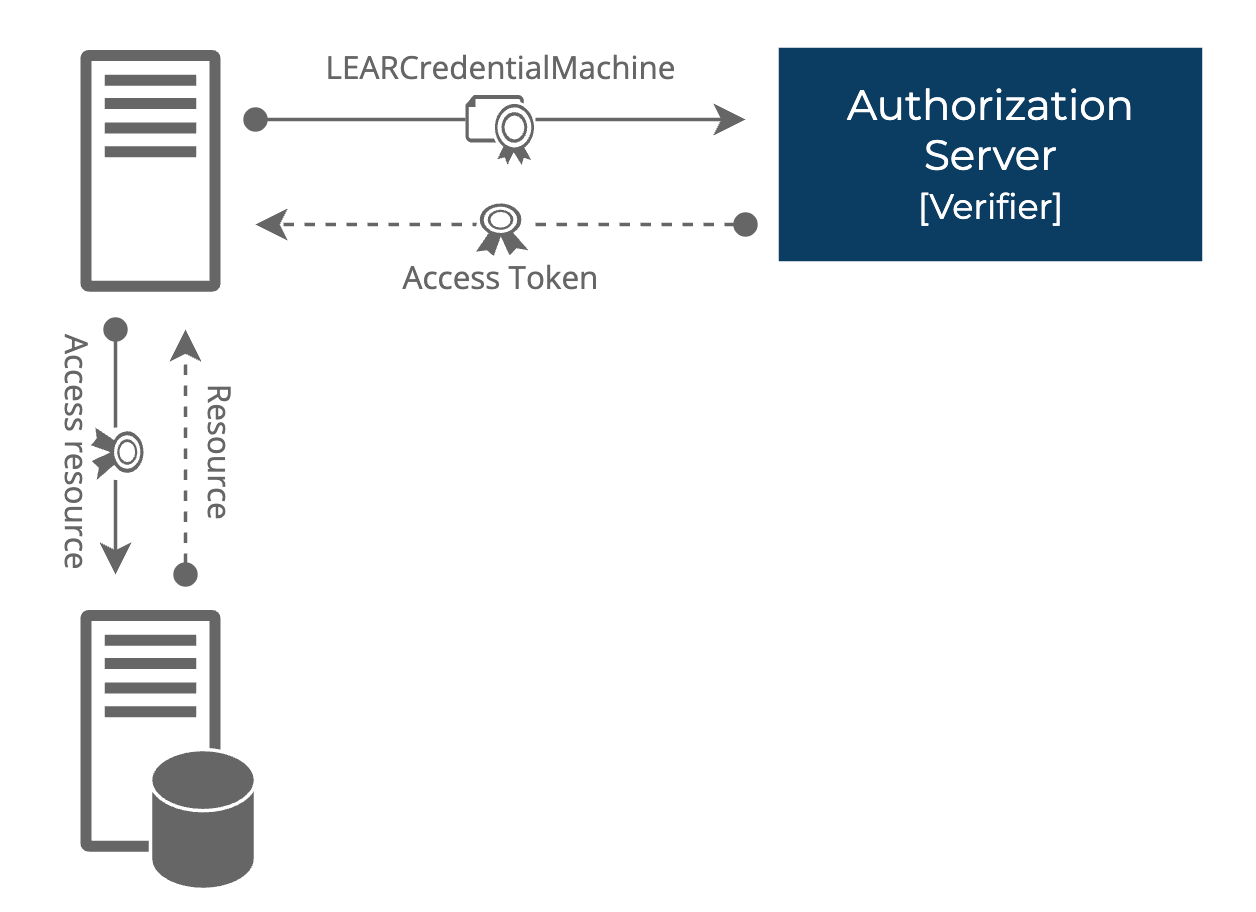
<span style="font-size: 20pt; font-family: Arial,sans-serif; color: #000000; background-color: transparent; font-weight: 400; font-style: normal; font-variant: normal; text-decoration: none; vertical-align: baseline; white-space: pre-wrap;">[![embedded-image-j2eCv6RV.png](https://knowledgebase.dome-marketplace.eu/uploads/images/gallery/2025-09/scaled-1680-/embedded-image-j2ecv6rv.png)](https://knowledgebase.dome-marketplace.eu/uploads/images/gallery/2025-09/embedded-image-j2ecv6rv.png)</span>

1. <span style="font-size: 11pt; font-family: Arial,sans-serif; color: #000000; background-color: transparent; font-weight: 400; font-style: normal; font-variant: normal; text-decoration: none; vertical-align: baseline; white-space: pre-wrap;">Client requests access token from Verifier Token Endpoint using client\_credentials grant and client\_assertion = VP (containing LEARCredentialMachine).</span>
2. <span style="font-size: 11pt; font-family: Arial,sans-serif; color: #000000; background-color: transparent; font-weight: 400; font-style: normal; font-variant: normal; text-decoration: none; vertical-align: baseline; white-space: pre-wrap;">Verifier authenticates client, validates VP and LEARCredentialMachine.</span>
3. <span style="font-size: 11pt; font-family: Arial,sans-serif; color: #000000; background-color: transparent; font-weight: 400; font-style: normal; font-variant: normal; text-decoration: none; vertical-align: baseline; white-space: pre-wrap;">Verifier issues access token with 1h lifetime.</span>
4. <span style="font-size: 11pt; font-family: Arial,sans-serif; color: #000000; background-color: transparent; font-weight: 400; font-style: normal; font-variant: normal; text-decoration: none; vertical-align: baseline; white-space: pre-wrap;">Client uses access token to call protected resources.</span>

### <span style="font-size: 20pt; font-family: Arial,sans-serif; color: #000000; background-color: transparent; font-weight: 400; font-style: normal; font-variant: normal; text-decoration: none; vertical-align: baseline; white-space: pre-wrap;">High-level flow</span>

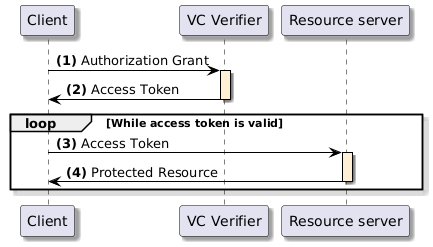
<span style="font-size: 20pt; font-family: Arial,sans-serif; color: #000000; background-color: transparent; font-weight: 400; font-style: normal; font-variant: normal; text-decoration: none; vertical-align: baseline; white-space: pre-wrap;">[![embedded-image-mGqKJU4g.png](https://knowledgebase.dome-marketplace.eu/uploads/images/gallery/2025-09/scaled-1680-/embedded-image-mgqkju4g.png)](https://knowledgebase.dome-marketplace.eu/uploads/images/gallery/2025-09/embedded-image-mgqkju4g.png)</span>

1. <span style="font-size: 11pt; font-family: Arial,sans-serif; color: #000000; background-color: transparent; font-weight: 400; font-style: normal; font-variant: normal; text-decoration: none; vertical-align: baseline; white-space: pre-wrap;">The client requests an access token by authenticating with the authorization server (VCVerifier) and presenting the authorization grant. Since the client authentication is used as the authorization grant, no previous authorization request is needed.</span>
2. <span style="font-size: 11pt; font-family: Arial,sans-serif; color: #000000; background-color: transparent; font-weight: 400; font-style: normal; font-variant: normal; text-decoration: none; vertical-align: baseline; white-space: pre-wrap;">The authorization server authenticates the client and validates the authorization grant, and if valid, issues an access token.</span>
3. <span style="font-size: 11pt; font-family: Arial,sans-serif; color: #000000; background-color: transparent; font-weight: 400; font-style: normal; font-variant: normal; text-decoration: none; vertical-align: baseline; white-space: pre-wrap;">The client requests the protected resource from the resource server and authenticates by presenting the access token.</span>
4. <span style="font-weight: normal;"><span style="font-size: 11pt; font-family: Arial, sans-serif; color: rgb(0, 0, 0); background-color: transparent; font-weight: 400; font-style: normal; font-variant: normal; white-space-collapse: preserve;">The resource server validates the access token presented and if valid, returns the resource requested.</span></span>